UE_LOG(LogTemp, Display, TEXT(“Begin devlog”));
I think there’s atleast one Unreal C++ developer right now, who at this exact instant is using this line to figure out why their favorite piece of code has exploded and made their game crash… more power to you buddy 🙌.
UE_LOG to a C++ dev is basically what Print String is to Blueprint devs. It’s not exactly the same, but I’m not going to go into the nuances of that today. UE_LOG is the standard method to get console-only logs in Unreal Engine. Now before going ahead I think its better if we just breakdown the above line of code (with a small modification), just to understand what it means…
// TestLogActor.cpp

void ATestLogActor::BeginPlay()
{
	Super::BeginPlay();

    // Create a string variable
    FString LogVar = FString("life is a repo");

    // UE_LOG(LogCategory, LogVerbosity, TEXT("LogMessage"));
    UE_LOG(LogTemp, Display, TEXT("Begin devlog with - %s"), *LogVar);
}
We already know now that UE_LOG is the macro which prints to console, so now lets talk about its input arguments,
LogTemp- This value defines the cateogry of the Log.LogTempis a category that is provided by Unreal as default to log anything without too much work.Display- This argument defines the Verbosity of the Log. The verbosity of the log defines how critical it is for the developer. Using Log Verbosity in the right way can also help a developer to de-clutter their logs. You can check more information about different Log Verbosities here.TEXT(...)- This is just a macro which handles strings for cross-platform compaitibility. The content inside this macro is what actually gets printed on the console.
So now in our situation the Log output is going to be,
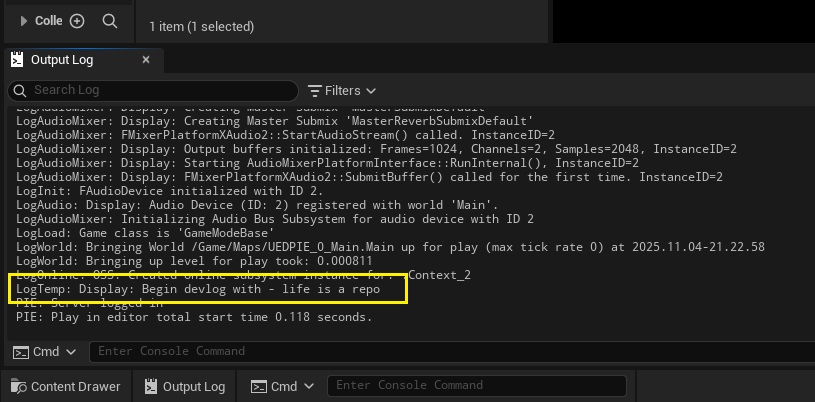
If you observe the image you can see that the output log contains 2 values printed before the actual message, which match the LogCategory and LogVerbosity in our UE_LOG. Both of these values act as filters for the logs that are printed which you can filter using the Filters tab in the Output Log.
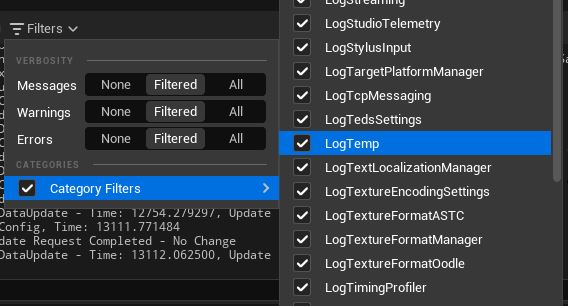
Once your game/application grows larger and there are multiple modules with multiple classes and sub-systems, it becomes really difficult to keep track of logs just using different verbosities or with the provided default filters like LogTemp. Here custom log categories come to the rescue, let’s see how create one in multiple ways…
I’ll explain the syntax for the macros later. First let’s look at how to use all of them as I guess most people are here for that.
1. Single Class Log Category
This method works by just adding a single line of code to our existing .cpp file. The downside of this method is that you can use the defined log category only inside the file where it’s created i.e. it’s scope is only limited to that .cpp file. Hence this is good for creating a new category which will be used just in one place, otherwise not so great…
// TestLogActor.cpp

#include "TestLogActor.h"
.
.

// Create new static log category
DEFINE_LOG_CATEGORY_STATIC(LogTestActorOnly, Log, All);


void ATestLogActor::BeginPlay()
{
	Super::BeginPlay();

    // Create a string variable
    FString LogVar = FString("life is a repo");

    // Changing the LogCategory here
    UE_LOG(LogTestActorOnly, Display, TEXT("Begin devlog with - %s"), *LogVar);
}
After compiling the above code and playing the game, you should see the following log,
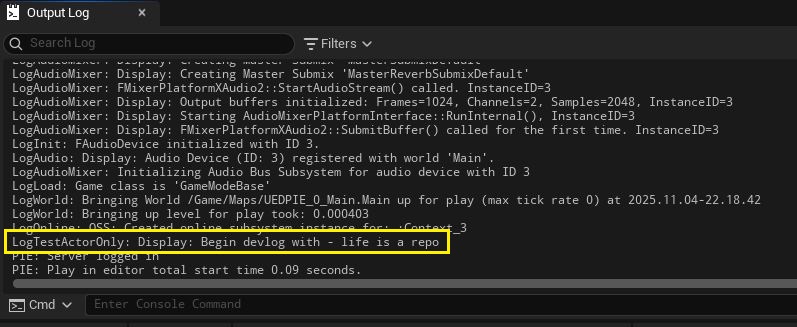
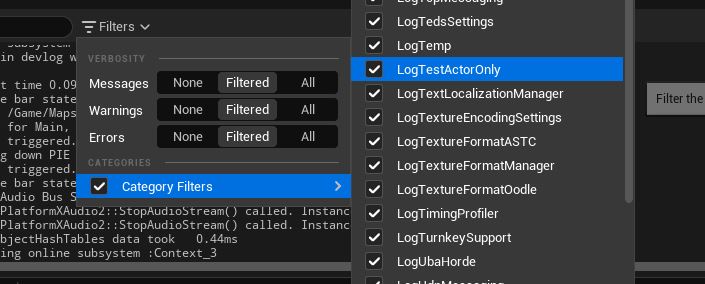
And you can even check the filter, you should see LogTestActorOnly as a new filter,
2. Log Category with a Wider Scope
This method is a lot more complicated as it needs us to add not one but two whole lines of code, lol. No this is fairly straight-forward as well but the actual macro is different from the one we were using previously. Unlike the previous category we need to “declare” this macro in the .h file first and then we have to “define” it in the .cpp file. After that we can use this log wherever we want by just including the .h file. It looks like this…
// TestLogActor.h

#pragma once
#include "CoreMinimal.h"
...
...

// Declare a new globally available log category
DECLARE_LOG_CATEGORY_EXTERN(LogGlobalCategory, Log, All);

// Business as usual from here...
UCLASS()
class LOGITRIGHT_API ATestLogActor : public AActor
{
    ...
    ...
Once the log category has been defined in the header file, you can use this log category wherever you have included it.
// TestLogActor.cpp

#include "TestLogActor.h"

// Older static category
DEFINE_LOG_CATEGORY_STATIC(LogTestActorOnly, Log, All);

// Just need to define this macro to use the new category
DEFINE_LOG_CATEGORY(LogGlobalCategory);


void ATestLogActor::BeginPlay()
{
    Super::BeginPlay();

    FString LogVar = FString("life is a repo");

    // Static log which we have already defined in this cpp
    UE_LOG(LogTestActorOnly, Display, TEXT("Begin devlog with - %s"), *LogVar);

    // New log with new category
    UE_LOG(LogGlobalCategory, Display, TEXT("Begin global devlog with - %s"), *LogVar);
}
Let’s make one more class just to test it out
// TestActor2.cpp

#include "TestActor2.h"
#include "TestLogActor.h"


void ATestPawn::BeginPlay()
{
    Super::BeginPlay();

    UE_LOG(LogGlobalCategory, Display, TEXT("This log is from the TestActor2"));
}
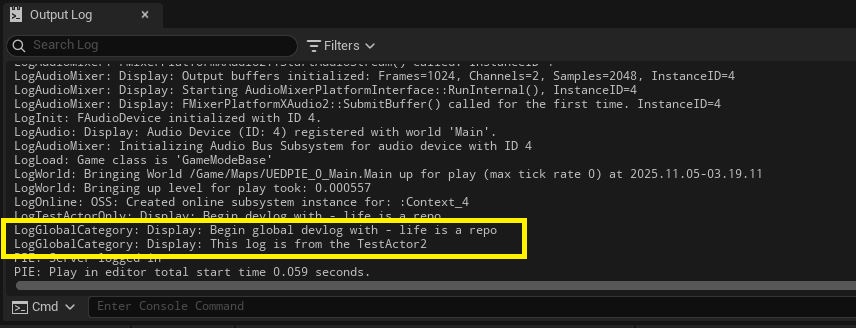
Drop TestActor2 in the level along with TestLogActor after compilation and hit Play. This is how the logs should look like in the Output Log,
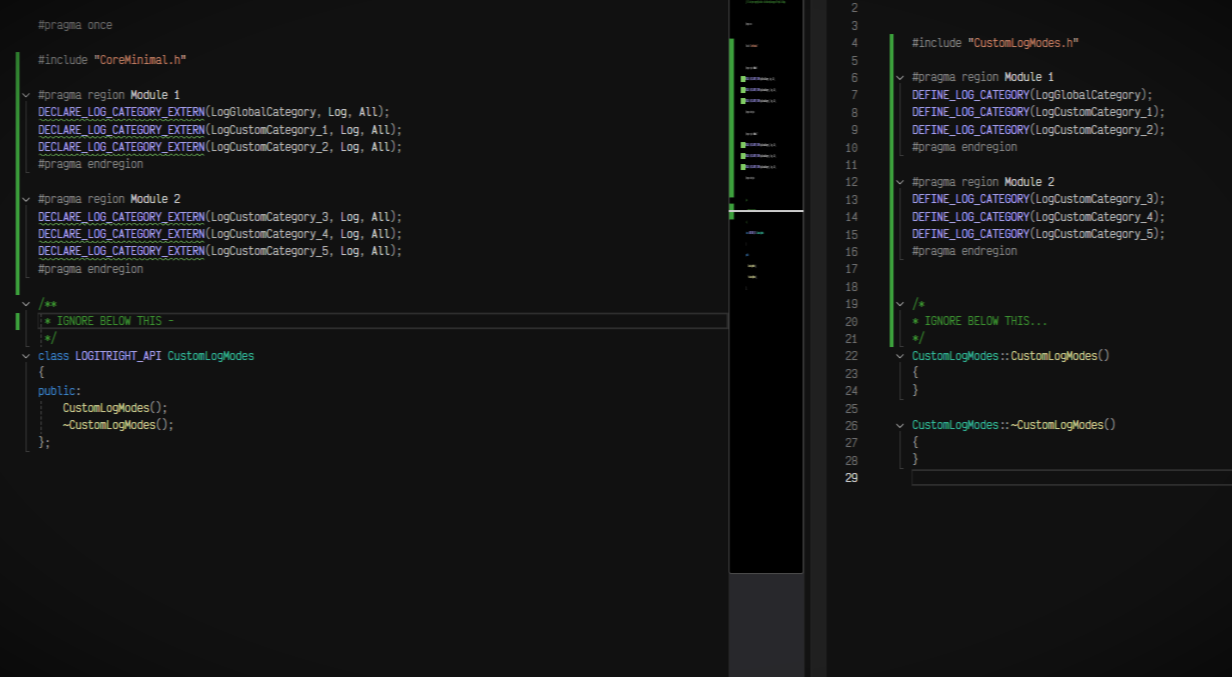
How I use it ?
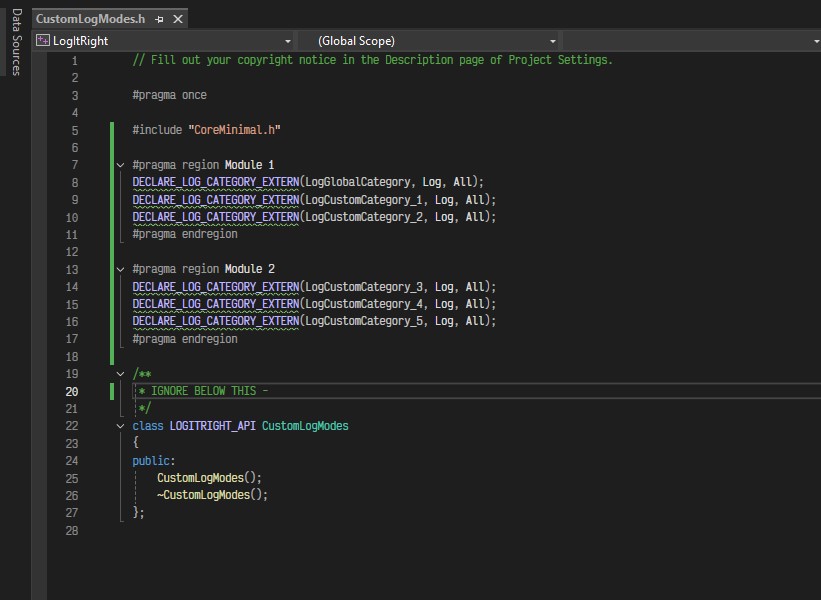
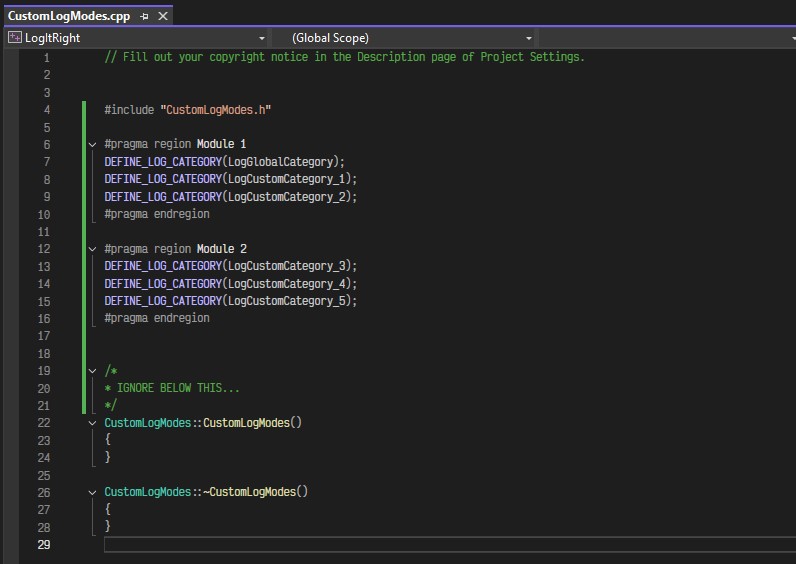
Honestly I had never even heard of DEFINE_LOG_CATEGORY_STATIC before writing this devlog 🙃 so clearly I have never used it before, but it definitely seems helpful for some quick custom logging. My usual method in small to medium scale projects is to create a common None class called something like CustomLogModes. I use the .h and .cpp files of this class to declare + define all my custom logs while using comments or #pragma region to isolate different log categories belonging to different modules. It just becomes a little simple as I just have to add a single class through-out my code if I want a custom log. In cases of large scale projects I think this class can be easily divided into multiple modules ex. CustomLogModes_Core, CustomLogModes_AI, CustomLogModes_UMG, etc. to keep the code a little easy to read and also a bit more efficient.
I also use this class to declare custom macros which help me print C++ logs on-screen (similar to Blueprint logs), I will show this in the next devlog.
An example of a CustomLogModes class,
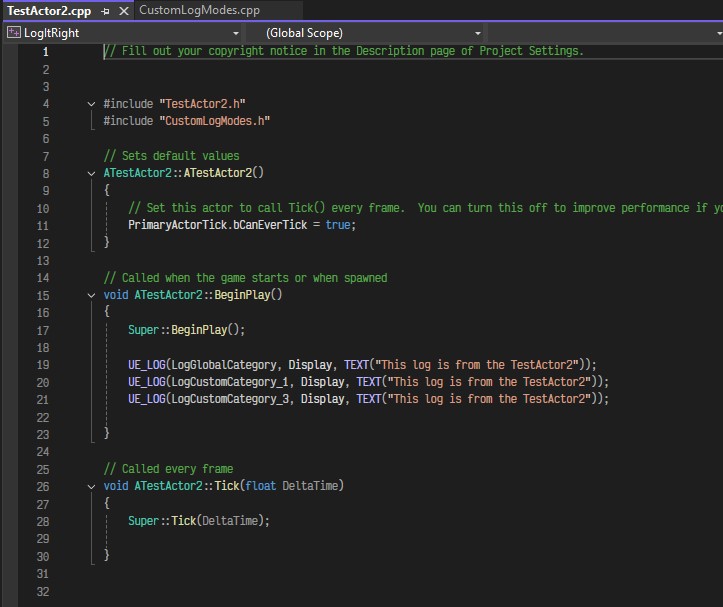
Based to this my updated TestActor2 looks like this
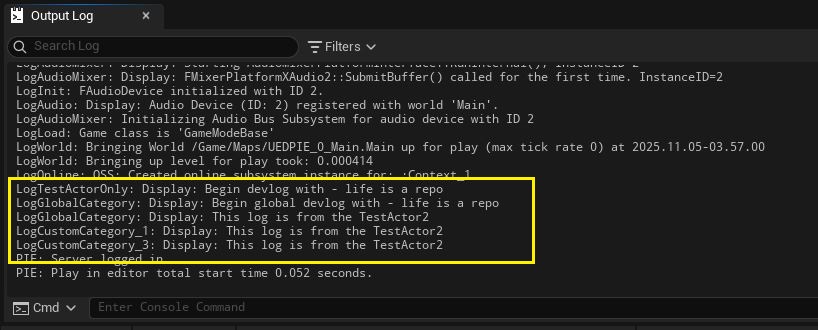
And finally the output log looks like this…
Syntax explanation
Okay this is the last thing I promise 😅. I’m just gonna explain the syntax of DECLARE_LOG_CATEGORY_EXTERN() as follows,
DECLARE_LOG_CATEGORY_EXTERN(CategoryName, DefaultVerbosity, CompileTimeVerbosity);
CategoryName- Name of the new category. You can set this is whatever you wish. Recommended to start with “Log” prefix as per standard Unreal practice.DefaultVerbosity- This is the default verbosity of this category. This is usually set toLogorDisplaybut you can set itWarningorErrortoo, depending on the category’s default severity.CompileTimeVerbosity- This tells Unreal Engine what maximum verbosity should be logged for this category in a packaged version of the game. When this is kept toAllit means that any log with this category should be printed no matter the verbosity. ex. If this value is set toWarningthen we will only see logs which are eitherWarningorErrorin the packaged game file.
I guess that is all for this one. I know these devlogs are too long. I will try to keep it short and simple in the upcoming ones. Cheers 🍻!