Decoding RTSP to a UTexture2D in Unreal (IPStreamMedia #4)
Finally the adventure begins! 👨💻
Where to start ?
It’s been a bit longer than I promised— I’d decided not to write again until I had something tangible on the execution side. After the FFmpeg tests that we discussed in the previous devlog, it was time to launch Unreal Engine, create a new empty plugin and run some tests to confirm the idea’s feasibility…
Milestone 1 - The Spike
Me and Claude planned the project such that we divided things broadly into 3 segments - prove FFmpeg integrates with Unreal Engine, setup a skeleton structure of the plugin modules, and wire the plugin to the FFmpeg libraries. I began with the first segment, the spike, where the idea was to create a simple system inside our plugin which would:
Use the FFmpeg libraries to connect to an RTSP stream ⇒ extract one frame of the video feed as AVPackets ⇒ decode it to AVFrame ⇒ convert it from YUV420P to BGRA8 (GPU format) ⇒ return it as a transient UTexture2D ⇒ slap it on a Plane using a dynamic material instance.
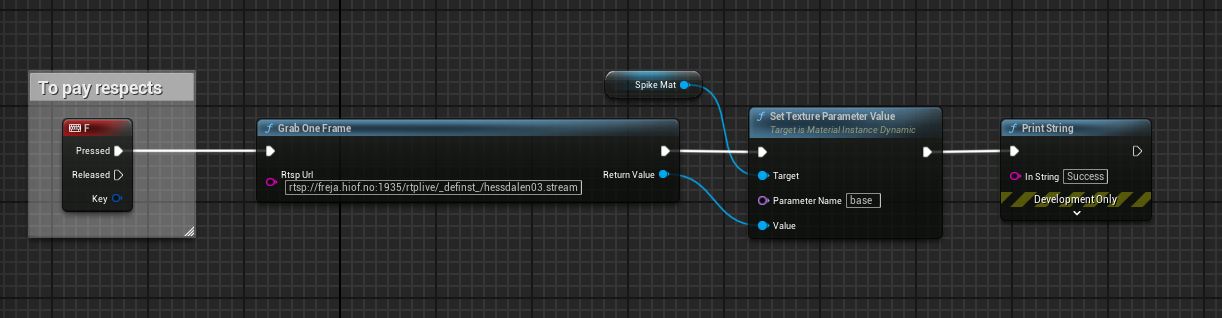
GrabOneFrame()
The simplest way execute this was to create a Blueprint Function Library class with a function that could take in an RTSP URL and return a single video frame as a UTexture2D
GrabOneFrame(FString RtspUrl) starts by creating an AVFormatContext, configured via an AVDictionary that holds the stream specs (rtsp, over tcp, etc). It then opens the stream with avformat_open_input(), checks if a video stream exists, and builds an AVCodecContext matching the stream’s encoding to initialize the decoder. From there it just runs the chain I have explained above and returns UTexture2D.
That’s it. The function finally ends after delivering a single frame of video.
Callbacks - the unsung heroes
If you notice in my explanation above, nowhere have I mentioned multi-threading, async tasks, or more such funny words 😵. That’s because this entire function call happens on the game thread, and yes, it does block the game thread. Now on a healthy stream that block’s for about a second, but what if the URL is valid but the source is not streaming? This may end up blocking the game thread infinitely.
To get around this issue FFmpeg uses AVIOInterruptCB, it’s a callback that continuously checks the status of blocking I/O operations like av_read_frame(). We setup this callback right at the beginning and connect it to the AVFormatContext, after which it keeps monitoring all the blocking I/O operations and exits out of them in-case of an error after a certain time-limit (which we set, and I had set it to 6 sec.).
Bro, just give me the figures -_-
So I ran two tests, one with a working stream coming from a CCTV on my LAN, the other was a broken stream whose URL I just found on Reddit. These figures were recorded by printing system time in the Output Log using Tick() and checking the gap in time when GrabOneFrame() was called,
Working Stream Latency = 0.999ms (Yeah I know I could have just said 1 sec 😬)
Broken Stream Latency = 6.039s, a 39ms overhead on the callback time-limit of 6sec, not bad.
Last, but the most interesting 🧐
If you are someone who’s thinking about creating your Unreal plugin using FFmpeg, you might find the hard way that the FFmpeg .dll files will not load when you try to launch the Unreal project; your plugin will just throw an error and kill Unreal.
LogWindows: Failed to load '.../UnrealEditor-IPStreamMedia-Win64-DebugGame.dll' (GetLastError=126)
LogWindows:   Missing import: avutil-61.dll
LogWindows:   Missing import: avcodec-63.dll
LogWindows:   Missing import: avformat-63.dll
LogWindows:   Missing import: swscale-10.dll
LogWindows:   Looked in: ../../../Engine/Binaries/Win64
LogWindows:   Looked in: F:\...\Plugins\IPStreamMedia\Binaries\Win64
   ... (~170 more search paths)
LogPluginManager: Error: Plugin 'IPStreamMedia' failed to load because module
                  'IPStreamMedia' could not be loaded.
Without going into too much detail, the reason behind this issue is that FFmpeg’s .lib files have been compiled using MinGW which creates GNU-format libaries, whereas the MSVC compiler needs short-import-format libraries for the delay-load system to work, which resolves .dll paths at runtime.
Delay-loading .dll’s is a standard practice when creating ThirdParty plugins in Unreal Engine.
The fix ?
Regenerate MSVC-format import libraries from the .def files that ship in the same FFmpeg folder as the .lib files, using MSVC’s lib.exe. This is how it looked in my case:
PS> cd /d "...\Plugins\IPStreamMedia\ThirdParty\FFmpeg\lib\Win64"
PS> lib /DEF:avutil-61.def   /OUT:avutil.lib   /MACHINE:X64 /NAME:avutil-61.dll
PS> lib /DEF:avcodec-63.def  /OUT:avcodec.lib  /MACHINE:X64 /NAME:avcodec-63.dll
PS> lib /DEF:avformat-63.def /OUT:avformat.lib /MACHINE:X64 /NAME:avformat-63.dll
PS> lib /DEF:swscale-10.def  /OUT:swscale.lib  /MACHINE:X64 /NAME:swscale-10.dll
PS> del *.exp
Done ?
Yes. The Github repo is a running a bit ahead comparatively, I will try to cover things up here as soon as I can. This has already become a bit long so,
That’s all for this one. Cheers! 🍻